Data tab on Model Options dialog.
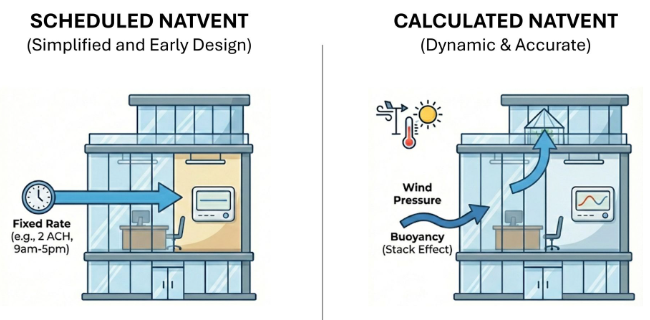
Natural ventilation (and infiltration) can either be 'Scheduled' or 'Calculated'.
You should generally use the Scheduled natural ventilation model option because it is quicker and easier to enter the related model data and because the simulations run more quickly. However if you need to calculate natural ventilation rates based on wind and buoyancy-driven pressure, opening sizes and operation, crack sizes etc then you should use the Calculated option.
Note: This natural ventilation setting also affects the way that infiltration is treated. It isn't possible to calculate infiltration as a constant (or scheduled) value while using the EnergyPlus Airflow Network for Calculated natural ventilation.
More on Natural Ventilation modelling.
There are 4 different ways to specify infiltration in calculations not using the AirflowNetwork (Heating and Cooling design and Simulation with Scheduled natural ventilation):
The selection made here will affect the units of the infiltration data prompted for on the Constructions tab under Airtightness.
The infiltration defined in the model is converted to m/s for input to EnergyPlus. The conversion from these options to m/s uses the methods described in EN 12831.
When the Calculated natural ventilation method is selected there are 2 ways to define the airtightness of the building: