
For Engineers

Spend more time designing and less time modelling. An easy-to-use interface to accurately quantify performance in the fastest available workflow.

Learn More

For Architects

Fast, accurate modelling throughout the whole design process gives you confidence in your designs from concept to completion.

Learn More

For Energy Assessors

Confidently generate certificates and maximise QA audit success using the fastest and easiest software available.


Learn More
Message

cURL failed. Error: The requested URL returned error: 404

API returned error:

DesignBuilder provides advanced modelling tools in an easy-to-use interface. This enables the whole design team to use the same software to develop comfortable and energy-efficient building designs from concept through to completion.

DesignBuilder v6 adds a substantial set of new features and improvements compared with v5 including tools for bulk data editing and a view showing placement of construction and glazing systems across the model. Other highlights include CHP and Ice thermal storage components, Uncertainty and Sensitivity analysis reports and a new set of extensibility tools opening DesignBuilder up for plugins and scripts to access the DesignBuilder model.  

Find out about Upgrading to v6

Download v6.1 

The main additions since v5 are: 

Modeller, Reporting and Visualisation

ModellerVis2

  • The Model data grid tool has been updated to allow data to be edited. You can also now define your own views on the data and there is an option to export the data to spreadsheet, modify and import back to the model. The tool is ideal for bulk editing of data and facilitating QA processes.
  • Graphical display of all constructions and glazing used in the model allows you to visually check and report where each construction and glazing system is applied in the model.
  • Graphical display of calculated natural ventilation airflows helps you to visually check the airflows through internal and external windows, vents, doors etc at the whole building level and right down to individual surfaces.
  • Rendered visualisations now allow lines to be used to more clearly represent surface edges leading to sharper-looking graphical outputs.
  • Site and building rotation now handled within the modeller allowing building geometry to be rotated accurately relative to the site.
  • Plugin for Revit 2019.

Gridedittool

Simulation

Hundreds of improvements have been made to the EnergyPlus simulation tools included with v6. The most important of these are:

  • EnergyPlus v8.9 is the target version.
  • Latest Phase Change Materials (PCM) with Hysteresis allow more accurate modelling of this innovative lightweight solution for adding thermal mass to buildings.
  • Simulations can be run for multiple years helping improve accuracy for very high mass cases such as ground domains and ground heat exchangers.
  • The Results Viewer has been updated and now includes options to view summary results tables as histograms and can also display results for multi-year simulations.
  • Improved heating and cooling system design summary outputs including fabric, ventilation and gains data.

Daylighting

v6Daylight2

  • Improved daylighting maps can now include numeric text labels for each grid cell and a range of options for colour palettes.
  • Radiance illuminance simulations are now run in parallel, significantly reducing wait times for larger models.
  • Improvements to the ASE Daysim simulations.
  • Option to define the ground plane extent.
  • Option to control randomness in Radiance results.
  • Improved management of calculation and display options.

HVAC

Generator2

  • Co-generation equipment (CHP) with options for internal combustion engine and micro turbine configurations. Trigeneration is also possible by combining generators with absorption chillers.
  • Ice thermal storage and additional plant operation schemes allow off-peak electricity to charge thermal stores.
  • Variable speed fan cooling towers.
  • Improvements to evaporative coolers.
  • Built-in curve generator tool allows curves to be quickly added to models based on manufacturer's data.

UK and Ireland Certification

  • Latest SBEM 5.6a for England, Scotland, Wales.
  • Section 63 tools for Scotland.
  • Latest SBEM v5.5h for Part-L and BERs in Ireland.

See the SBEM and DSM approval page.for information on which DesignBuilder version is approved for use in each region.

Uncertainty and Sensitivity Analysis

UASA4

The result of an ongoing collaboration with UCL and EnSims, our new Uncertainty and Sensitivity Analysis tools enable a systematic quantification of risk and an evaluation of the most influential aspects of a building design in the context of energy and environmental performance. By applying a "probabilistic" definition of input design variables, the reports provide a strong supporting basis to help guide design and operational decision making.

The main features are:

  • Uncertainty and Sensitivity analysis results are presented as histograms along with summary statistics. Reports include clear text descriptions to help you interpret the results.
  • Sensitivity analysis is undertaken using multivariate linear regression. Regression parameters and standardized coefficients (a sensitivity measure) are calculated for every output variable.
  • Input design variable sampling based on probability distribution curves. More than 20 discrete and continuous distributions are available for selection and customisation.
  • Various input design sampling methods include: Random, Random Walk, Latin-Hypercube, Sobol and Halton.

Optimisation

  • DesignBuilder v6 also includes 3 powerful new types of custom variable to give you complete control of the parametric variations applied to the model as part of optimisation, uncertainty and sensitivity analyses.
  • The optimisation tools now allow "additional outputs" to be included alongside objective and constraint KPIs to enable more in depth post process analysis to be carried out.
  • Building rotation design variable provided (complementing previously existing site rotation).

Enhanced Extensibility

  • An API for plugins and scripts links to the DesignBuilder object model allowing an unlimited range of custom calculations, reports and model processing to be added by users and 3rd party developers.
  • Python scripting enables simulation inputs and outputs to be automatically processed before and after simulations based on scripts that you write.


Find out about Upgrading to v6.

Download v6.1


We've collected the common questions related to purchasing DesignBuilder on to this page. Please check the answers below before contacting us with your questions.


MSB ADD FAQ MODULE HERE


Download v7
            Web Demo            New Version Feature List


Version 7 adds powerful new features that extend DesignBuilder’s capabilities and improve modelling workflow and productivity.

EnergyPlus v9.4

DesignBuilder is the most mature and capable user interface to EnergyPlus, our industry's gold-standard Building Energy Simulation engine. DesignBuilder v7 includes the EnergyPlus v9.4 engine with various performance and feature enhancements. These include a new pixel counting shading method for faster simulations of large models on machines with dedicated graphics cards.

Slide1
Extended Interoperability

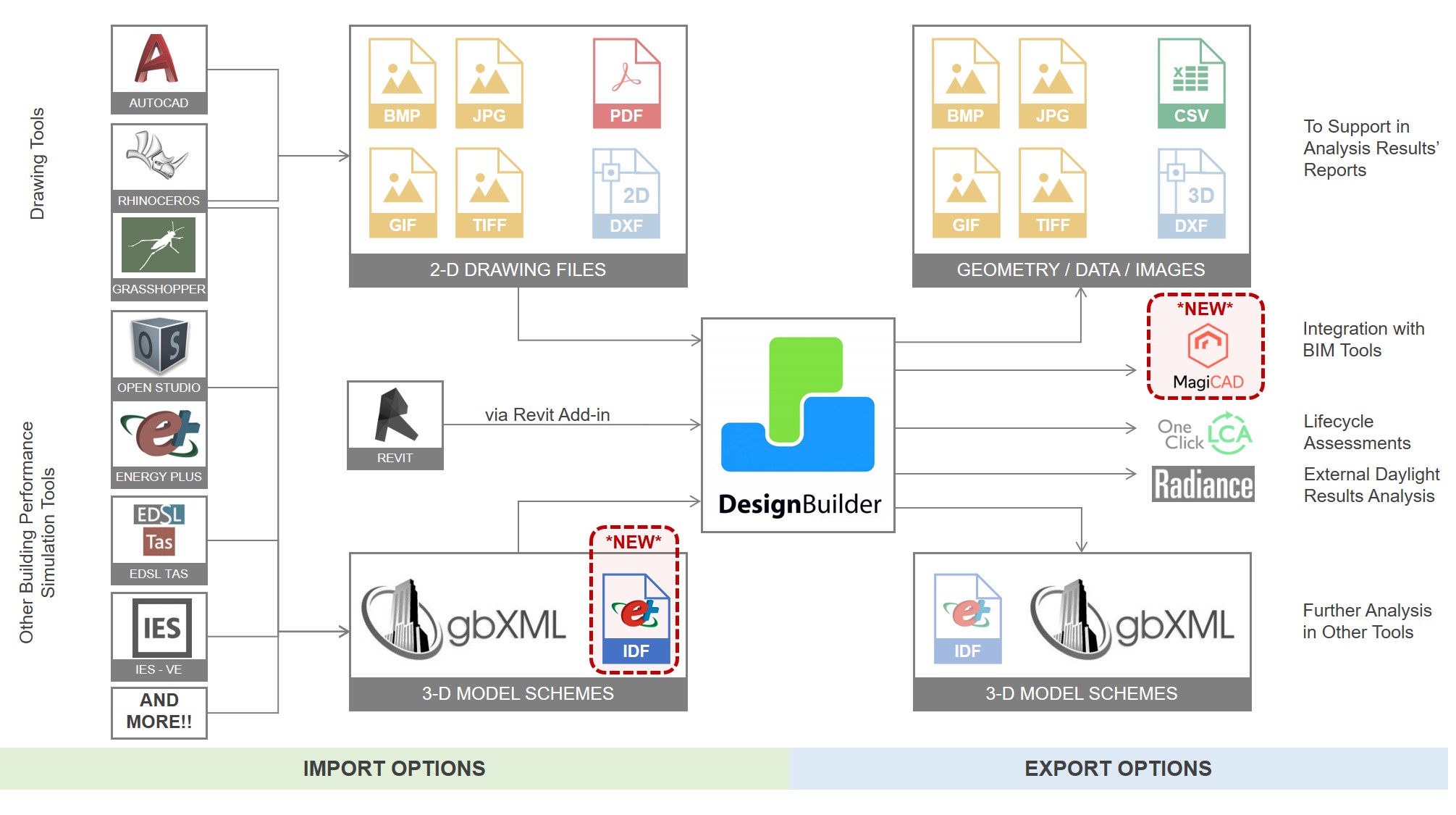
DesignBuilder provides multiple import and export options in a variety of formats to maximise interoperability with other tools. Two new interoperability options have been added in v7:

  • You can now Import EnergyPlus IDF files created in 3rd party tools such as OpenStudio into DesignBuilder. The new IDF Import tool allows the building geometry, construction, glazing, materials and shading data in EnergyPlus IDF model files to be imported into a DesignBuilder model. Zones on the same storey are grouped into a block which makes re-partitioning and data organisation easier. All EnergyPlus versions from 7.2 forwards are supported.
  • A new Link to MagiCAD allows you to export your loads from DesignBuilder to MagiCAD to further develop the heating, cooling and ventilation design. A typical workflow involves opening DesignBuilder directly from within the MagiCAD Revit plugin, running the loads calculations in DesignBuilder and importing the results back into MagiCAD where they can be used for equipment selection etc.
  • Improvements to gbXML import for models with spaces that are not fully enclosed.
Daylighting

DesignBuilder v7 includes a major upgrade of our daylighting tools. The most important new features are:
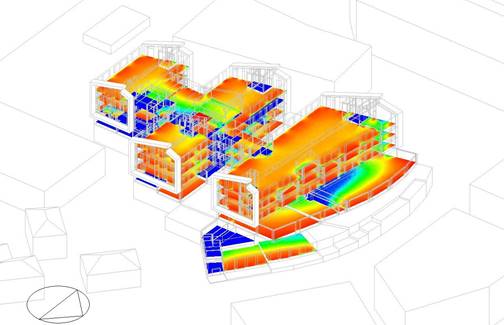
  • Annual Climate Based Daylight Modelling (CBDM) simulations are now run directly in Radiance fully implementing the method specified in LM-83-12, including dynamic blinds for sDA 300/50 calculations.
  • New calculations and formatted reports are provided for:
    • LEED v4.1 Daylight Credit Options 1 + 2 and
    • BREEAM HEA 01 Option b annual daylighting credits.
  • Translucent Component blocks can now be simulated in daylighting simulations making it easier to accurately include objects such as trees in your model.
  • Daylight distribution maps are now displayed in the 3D modeller with options for numeric labels to be displayed in each cell and for colour palettes to be used. The new display helps make the context of the daylighting results clearer and your reports more impactful.
Slide3
Enhanced Extensibility

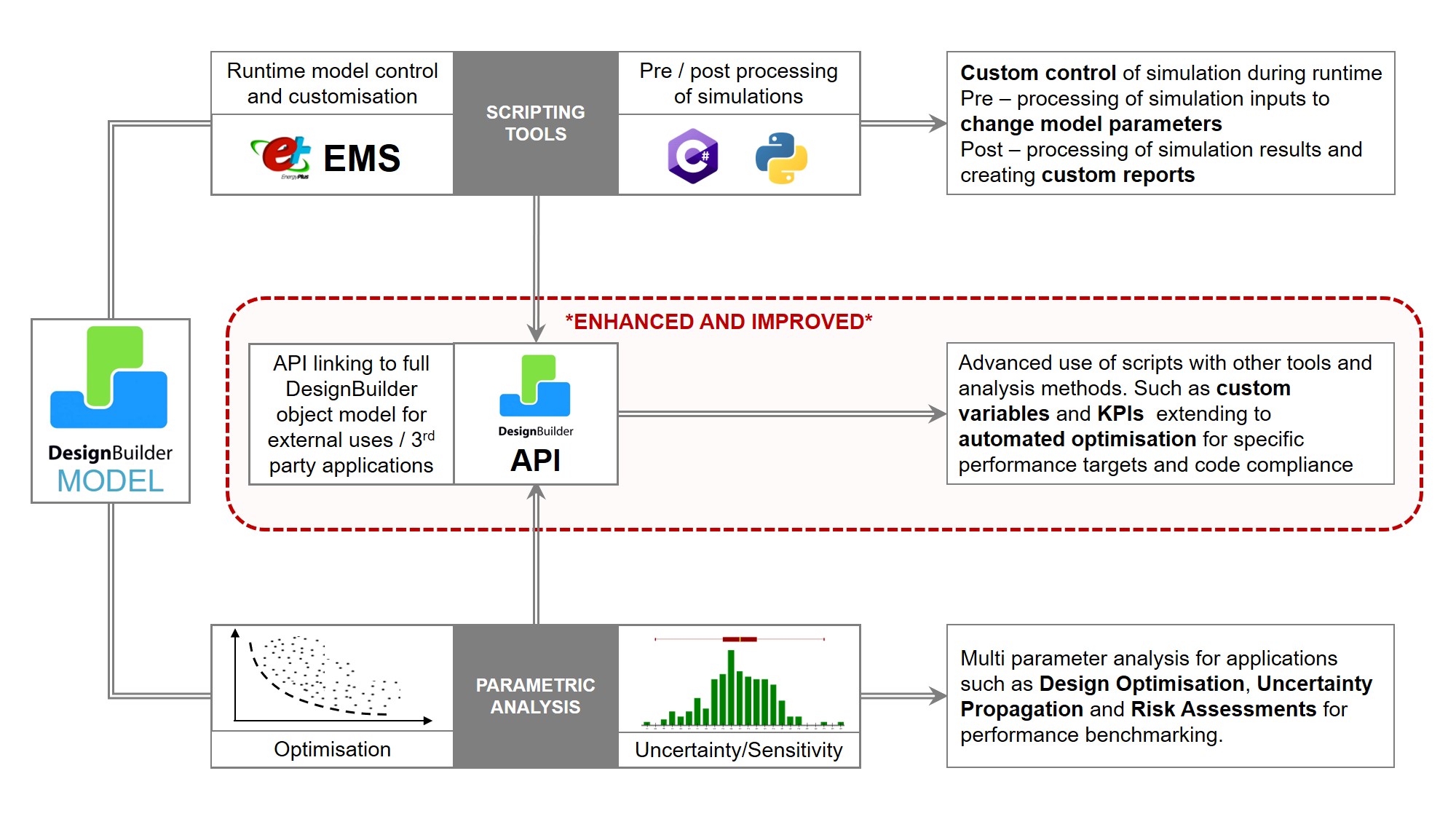
DesignBuilder has always provided a relatively open platform with full access to simulation inputs, outputs, EMS runtime scripting tools and EnergyPlus source code. In v7 the scripting tools have been updated to enable simulation inputs and outputs to be processed before and after simulations with a choice of Python and C# languages:

  • Python scripting provides access to the DesignBuilder API to enable an unlimited range of custom calculations, reports and model processing.
  • Deeper access is now provided to the DesignBuilder optimisation, parametric and uncertainty and sensitivity analysis engine. New options allow:
    • custom design variables to be set up using scripts, and,
    • any EnergyPlus or custom calculated output can now be used as a KPI.

These improvements to DesignBuilder's scripting tools open up new opportunities for energy modellers to search for the best solutions to project-specific performance targets and compliance requirements.

2D Ground Modelling with Kiva

DesignBuilder v7 includes Kiva 2D ground modelling for more accurate building-ground heat transfer calculations. Kiva is a validated state of the art ground modelling component within EnergyPlus to calculate the key ground temperature profiles through the ground domain at runtime. These profiles connect with the building ground adjacent surfaces to improve the accuracy of the ground heat transfer calculations.

Only a small amount of extra data is required to drive Kiva and there is little noticeable effect on simulation times. Unlike the constant temperature approach used in most energy models, it is not necessary to enter ground temperature data, which is rarely (if ever) available in practice. Instead, deep ground temperatures calculated from the hourly weather data are used as the lower boundary condition in the simulations.

There is even a “Kiva Basic” option which provides the extra accuracy but with only a few additional input parameters.

LEED and ASHRAE 90.1 Appendix G 2013 and 2016

DesignBuilder V7 supports ASHRAE 90.1 App G 2013 and 2016 modelling including the latest baseline HVAC systems.

Also you can now automatically generate the LEED v4 Minimum Energy Performance Calculator reports directly from DesignBuilder with all the key data items filled out.

Modeller Updates

The modeller and visualisation tools sit at the heart of the DesignBuilder workflow and v7 sees some significant improvements in this area:

  • The Model data grid tool has been updated to allow HVAC data to be read and edited in a data grid form. The model data grid view data management tool enables you to define your own data views, optionally export the data to spreadsheet, modify it and then import it back to your DesignBuilder model. You can also now read in model data for component blocks and solar collectors. The tool is ideal for rapid bulk editing of model data and for QA processes. Templates can also be loaded to the Grid edit tool in the new version.
  • A Follow Path tool has been added to help modellers generate complex block shapes, building on the capabilities provided by the existing block edit tools such as Boolean geometry, Add surface, Cutting, Drag face and Stretch tools.
  • DesignBuilder now offers to automatically reload templates to the model after they have been edited.
  • Improvements to the "snapping" mechanism including a new "sticky" feature which helps you to connect with existing points more positively. Also snaps have been added at site level to help multiple buildings to be accurately positioned relative to each other.
  • New Detailed HVAC sequencing controls are available at HVAC zone level.
  • High temperature radiant heater is ideal for simulating warehouses etc.
Customise the UI with Colour Schemes

DesignBuilder v7 allows you to change the appearance of your working environment by selecting one of our fresh new colour themes… or create your own for something completely different!


Download v7
            Web Demo            New Version Feature List

There are a range of license options available to suit your organisation's requirements. If you aren't sure which software product you require then please check the Product Overview to find out more.

International Versions:  French French       Spanish Spanish       Italian Italian    

Payment Options

  1. Make a secure online purchase using a credit/debit card via Sage Pay.
  2. Request a DesignBuilder Quotation and convert this to an invoice within 30 days by going to Your Order History. You then pay the invoice by Sage Pay or bank transfer (get in touch with us for bank details).

Just choose your preferred payment option during checkout from the online purchasing process.

Please contact us for our bank details if you plan to pay by bank transfer or if you need any further information about buying DesignBuilder.

Based on the gold standard open source EnergyPlus simulation engine, DesignBuilder is now the most widely used energy modelling tool in education. University departments prefer DesignBuilder because it is quick and easy to learn, allowing the teaching process to focus on design and simulation issues. At the same time the software offers researchers unparalleled flexibility through access to EnergyPlus and Radiance input files and a range of advanced scripting tools.

We have an active education programme to assist university departments in using the software as part of their teaching process and can offer:

  • Substantial educational discounts for universities and research organisations.
  • Free student license packages for universities purchasing an educational site license.
  • Student personal licences for £50.
  • Interactive on-demand training content teaches students all the necessary software fundamentals without any lecturer time or the need for a classroom.
  • Freely available teaching materials for use on university courses.
"We have had a very positive experience with DesignBuilder this semester as it was the first year we shifted from our previous simulation software to DesignBuilder. Our students seem to spend less time on learning the software and more on actually understanding the results and being able to analyse them."
Dr Shahaboddin Resalati - Senior Lecturer in Sustainable Architecture and Building Physics Architectural Engineering Group, School of Architecture
Oxford Brookes University, UK

     See also our Education testimonials page to read what other university course leaders, researchers and students are saying about DesignBuilder.

Discounts for Educational Establishments

You are entitled to a substantial discount on the listed commercial price if:

  • You are purchasing DesignBuilder to be used exclusively for educational purposes within a school, college, university or other educational establishment or
  • You are a commercial organisation planning to use the software exclusively for educational events such as training workshops.    

Please make sure you are logged in before you access the discount application form. If you do not have a login and password, please register.

  • Fill in our Educational discount application form giving contact details of your organisation  and your requirements (you must be logged in to the site first).
  • Once we approve your application you will be notified by email. The email will include a discount voucher code. (We usually respond within 48 hours).
  • Enter the code during the checkout stage of the online order process to obtain your discount.

Discounted Student Personal License

Student personal licenses are provided free to educational institutes when they purchase educational site network licenses. The number of free licenses offered will be equivalent to the highest number of seats purchased on any particular module. Thereafter, these licences can be purchased at highly discounted rates.

In cases where student personal licences are not available through the university, undergraduate and postgraduate students wishing to use DesignBuilder on their own computer can apply to purchase a licence for £50 per year.

In summary, students can obtain a student personal license in one of 3 ways:

  • Directly from their university (if the university has a student license package).
  • By applying from this website using the student discount form (you must be logged in to the site first).
  • From a local DesignBuilder reseller.

When applying for a student license, you must supply the name of your educational establishment, the department, the name of your supervisor and a departmental contact telephone number. You must be in full time education for at least 3 months from the time of application.

Once your application is approved, you will be able to purchase the license on the website. You are able to re-apply for a student personal licence after expiry. Support is limited to the on-line tutorials and training resources on our website. We are not able to provide support through our help desk for students.

If you plan to use DesignBuilder on a computer at your school, college or university you should purchase an educational license instead of a student one.

Note that universities using DesignBuilder for teaching or research must order at least one educational licence to enable the staff to support the students. Staff may not use student licences and student licences may not be installed on university machines.

Please make sure you are logged in to the website before you access the student discount application form. If you do not have a login and password, please register.

Get Started with DesignBuilder for Free

Find out for yourself why so many companies and universities choose DesignBuilder
  • "I have watched the steady progression of DesignBuilder for the last 10 years or so, and having seen recent improvements in DesignBuilder’s HVAC and LEED modeling I decided to attend their training. I was both surprised and pleased to find how easy to use DesignBuilder is compared to the other similar tools I’ve tried, especially given the power and flexibility offered by the underlying EnergyPlus, Radiance and CFD engines. I’m really pleased that after a week’s training I feel ready to produce accurate results and outputs for loads and sizing calculations and energy analysis. The ability to also undertake fully-integrated daylighting and CFD analysis from the same model you use for loads and thermal simulations is also a very big plus point."
    David Ellis PE, Virginia 22102, USA
  • " We have had a very positive experience with DesignBuilder this semester as it was the first year we shifted from our previous simulation software to DesignBuilder. Our students seem to spend less time on learning the software and more on actually understanding the results and being able to analyse them."
    Dr Shahaboddin Resalati - Senior Lecturer in Sustainable Architecture and Building Physics Architectural Engineering Group, School of Architecture, Oxford Brookes University, UK
  • " The graphical user interface of DesignBuilder is comprehensive and intuitive, allowing us to model complex buildings simply and quickly. The data management structure (data hierarchy and inheritance) allows us to assign model data quickly and accurately, improving our efficiency. The power and flexibility of EnergyPlus, the underlying simulation engine, enables us to model a building in fine detail where required so that we can accurately analyse its performance. This is particularly helpful when calibrating the model with actual energy consumption to obtain a reliable close match when assessing potential improvements and energy conservation measures."
    Alessandro Righi, architect and researcher at IUAV - Laboratory technical physics
  • " We utilised DesignBuilder software to carry out detailed natural ventilation assessments on buildings at our UK gas plants in order to demonstrate compliance with hazardous area regulations. First of all I would like to praise the initial support received from DesignBuilder staff, who were extremely knowledgeable and provided a welcoming point of contact for support and advice. Having used the majority of the alternative building simulation software packages on the market, I found without a doubt DesignBuilder the most user friendly and enjoyable to use. The modelling program itself is fantastically simple allowing even complex buildings to be developed quickly and easily. The user interface of the calculation part of the software is well thought out and the results outputs are graphical and concise. Within a few hours I had got to grips with the software and obtained the results I desired. It has allowed Shell to present compliance to regulating authorities, who were also impressed with the visualisation displays and graphical outputs. I fully endorse DesignBuilder, and in particular how easy it was to learn and use compared to similar building simulation software on the market. "
    Iain Begg, Senior HVAC Engineer, Shell Projects and Technology Group, Aberdeen, Scotland
  • " DesignBuilder’s clear, well-structured layout and intuitive help system makes it a much simpler tool to learn and use, and compared to other simulation packages the creation of professional-looking geometry is much easier. The ease of use extends to other areas of the program such as thermal bridging analysis and setting up HVAC systems, and the capability to easily model adjacent ground conditions is very useful. A very important aspect of our work is optimisation, and DesignBuilder seems to be the only software that currently provides this functionality. We are encouraged that the development team have taken some of our functionality and user efficiency suggestions on board for the next release. We are already using DesignBuilder for research, and for the above reasons we think it is a tool that our students will find easier to use so we will be using it for teaching next academic year. "
    Professor Ljubomir Jankovic, Birmingham School of Architecture, Birmingham City University
  • " We decided to go out and measure some natural light levels in buildings that we have access to.... One building was our own office, and the other was a green building we worked on which will be tenanted in 2 weeks so we had a chance to take readings in the same environment for which we simulated. I am happy to say that the DesignBuilder results are very close to what we measured... What impresses me is that if we measure a value of 250 lux at 3m from the facade, DB returns similar values. This means that if we say that 40% of a building's usable area will have lux levels of 250 or above, then the measured results correlate with that. ... It certainly makes us confident in the results we give to clients."
    Warren Gray, Mechanical Engineer, Solid Green Consulting
  • " First of all I would like to thank you very much for the outstanding online training that you made possible for our team. I was very happy that we could join with three people in an online training that offered us as an outstanding value. ... The course with DesignBuilder is going very well and we have some great feedback from the students.... Your data entry GUI makes it easy for students not only to “accept defaults” but to experiment. In addition your online help is extremely thorough and you present not only the theoretical background but also offer great links to the reference. You might not realize what a powerful learning tool this is; but it is. We think you have created something very valuable and we are looking forward very much to where your company goes from here... Thanks again for your great support."
    Dr Manfred J. Zapka, University of Hawaii
  • " Gold stars all round .... Many thanks again for the high quality of customer service I receive from all at DesignBuilder, it is quite refreshing and a credit to your company."
    Mark O’Neill, DM Hall LLP, Glasgow, Scotland
  • "I worked with several building simulation applications and chose DesignBuilder because it had all the tools I needed in one place. It fitted well with the combined operational and embodied emissions objectives of my book, whilst squeezing every ‘gram’ of building performance through multi-objective optimisation."
    Prof Jankovic, Energy & Buildings, University of Salford, UK

Case Studies

Subscribe to the DesignBuilder Newsletter

Get the latest news on DesignBuilder products, updates, webinars and training.

Contact Us

  • DesignBuilder Software Ltd
    Office D
    Five Valleys
    Stroud, Gloucs
    GL5 1RR
    UK 
  • +44 (0) 1453 755500
  • info@designbuilder.co.uk
keyboard_arrow_up